This Systeme.io funnel builder review focuses on choosing templates, editing pages, and connecting an opt-in page to a thank-you page and automation.
The hands-on evidence covers a small lead-generation setup. The separate lead magnet test verified one subscriber’s signup, one delivery email, PDF access, and unsubscribe. Checkout, upsells, A/B results, and conversion improvements were not tested.
If you are building an online business by yourself, a sales funnel can quickly become one of the most important parts of your software stack.
But it can also become one of the most expensive.
That is one reason I wanted to test Systeme.io’s funnel builder for myself.
Instead of simply looking at a feature list, I created a test funnel, explored the available templates, edited an opt-in page, created a thank-you page, and connected the funnel to Systeme.io’s automation tools.
So, is the Systeme.io funnel builder actually good enough for a solopreneur in 2026?
For many simple online businesses, I think it is.
It is not the most advanced funnel platform available.
But it combines the core funnel-building tools with email marketing, automation, courses, and other business features inside the same platform.
And because you can start on the Free plan, the barrier to testing it is unusually low.
Here is what I found.
Affiliate disclosure: This article may contain affiliate links. If you sign up through one of these links, Growth Stack Lab may earn a commission at no additional cost to you.
Table of Contents
Quick Answer: Is Systeme.io’s Funnel Builder Good?
Yes, for a straightforward lead-generation funnel. I could edit the pages and connect a form to email delivery. For a complex sales path or a highly specific page design, the evidence here is too limited to judge the fit.
| Area | Evidence | What it means for a solo business |
|---|---|---|
| Templates and page editing | Observed: selected a template and edited an opt-in and thank-you page. | A workable starting point for a simple signup page; template content still needs checking. |
| Form-to-email connection | Executed in the separate lead magnet test: one signup, one email, PDF access, and unsubscribe. | The small delivery flow worked in that configuration; a multi-email campaign was not tested. |
| Free-plan capacity | Official limits checked October 8, 2026: 3 funnels, 15 funnel steps, and 1 A/B test. | Count the pages and variants you need before expanding beyond the initial funnel. |
| Sales and optimization | Checkout, upsells, and A/B testing are documented features; no purchase or A/B result was measured here. | Validate your own sales path before relying on it for an offer. |
The feature list is broader than my test. See the Systeme.io feature overview and the detailed official plan comparison for current availability and limits.
For the build steps and recorded subscriber result, see the lead magnet funnel test. This review stays focused on the editor and the work needed to connect its pages.
The Systeme.io Email Marketing Review (2026) covers sender setup and email features separately. Its campaign discussion should not be read as a completed multi-email sequence test.
What Is the Systeme.io Funnel Builder?
The funnel builder is the part of Systeme.io used to create a sequence of pages that moves a visitor toward a specific action.
That action might be:
- Joining an email list
- Buying a product
- Registering for a webinar
- Accessing a course
- Moving to another offer
Systeme.io currently provides four main funnel types when creating a new funnel:
- Build an Audience
- Sell
- Custom
- Run an Evergreen Webinar
The evergreen webinar option is limited to higher-tier plans. Systeme.io funnel setup guide
For my own test, I focused on a basic lead-generation funnel.
That is probably the most relevant starting point for many new solopreneurs.
The structure was simple:
Opt-in page → Thank-you page → Automation
That was enough to understand how the different parts of the platform connect.
Creating My First Test Funnel
The first thing I noticed was that Systeme.io tries to keep the funnel creation process simple.
You create a funnel, select the type you want, choose the domain and currency where relevant, and then start adding or editing steps.
I created a test funnel specifically to explore how the system works from a solopreneur’s perspective.
Instead of trying to build a complicated sales system, I wanted to answer a simpler question:
Can someone running a one-person business create a real lead-generation funnel without needing a developer?
In my experience, yes.
The overall structure was straightforward enough that I could move from creating the funnel to editing the individual pages without having to learn a separate technical system.
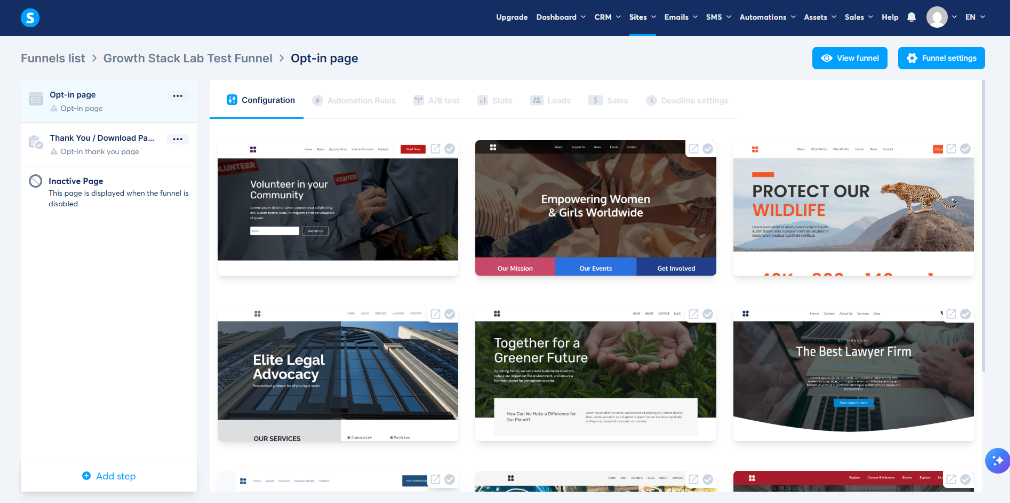
The landing-page template selection screen I used while building my Systeme.io test funnel.
After this initial builder test, I went one step further and built a complete lead magnet funnel in Systeme.io, including the opt-in page, thank-you page, PDF delivery, automated email, and unsubscribe verification.
The Funnel Templates Make Starting Faster
One of the first decisions inside a funnel is choosing a page design.
Systeme.io provides pre-built templates for different types of funnel pages.
The official funnel builder currently promotes templates for lead generation, sales funnels, webinars, launches, memberships, and other common use cases. Systeme.io funnel features
During my test, I looked through the available landing-page templates rather than building a page from scratch.
That makes sense for a solopreneur.
The goal is usually not to spend hours designing the perfect landing page.
The goal is to get something functional online, start collecting data, and improve it later.
Templates reduce the amount of design work required before you can launch.
Editing a Landing Page Without Code
After choosing a template, I opened the visual page editor.
This is where the funnel builder becomes much more practical for a non-technical user.
Instead of editing HTML or CSS, you work visually with page elements.
Systeme.io describes the funnel editor as a drag-and-drop builder that requires no coding. Systeme.io feature overview
I tested this by editing an actual landing-page template.
The page could be changed directly inside the editor rather than being rebuilt manually.
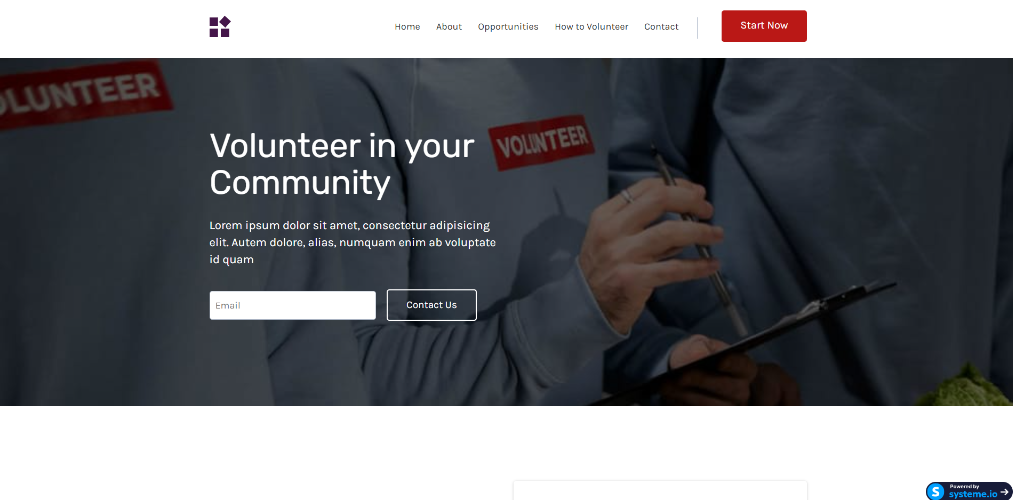
The Systeme.io page editor I used while testing a landing-page template.
What I Liked About the Page Editor
The useful part was being able to start with a template and change the page inside the visual editor. The screenshots above show the template selection and editing screens used in this review.
The later lead magnet setup also required changing the page copy, simplifying the layout, and configuring a PDF download button. These are concrete editing tasks the builder supported. I did not time them or compare the same build in another editor, so this is not a speed benchmark.
Where the Editor Feels More Limited
The template was a starting point, but it still contained copy about unrelated services. In the lead magnet setup, I replaced that text and removed unnecessary navigation where possible. A finished headline alone did not mean the whole page was ready.
The download button also failed to respond in the initial test. I changed its action from Open URL to Download file, uploaded the PDF, and checked the live page again. That records a configuration problem and its fix; it does not establish that Open URL is generally broken.
For a solopreneur, the practical extra work is checking the full template and each button’s action after editing. Highly customized layouts, advanced interactions, and cross-device design behavior were outside this test, so I cannot rate those from the evidence here.
Adding Funnel Steps Is Straightforward
A funnel is more than a landing page.
You usually need several steps.
For example:
Visitor → Opt-in page → Thank-you page → Email follow-up
or:
Visitor → Sales page → Checkout → Upsell → Thank-you page
Systeme.io lets you add funnel steps as needed.
Its help documentation also confirms that Custom funnels can be expanded by adding new steps manually. Systeme.io funnel setup guide
During my test, I used an opt-in page and thank-you page.
That basic structure was enough to create a functional lead-generation flow.
Funnel Automation Is One of Systeme.io’s Strongest Advantages
This is where Systeme.io starts feeling different from a standalone landing-page builder.
The funnel can connect directly to the automation system.
For example:
A visitor submits a form.
That becomes the trigger.
Then Systeme.io can perform an action such as:
- Send an email
- Add a tag
- Enroll the contact in a course
- Move the contact into another workflow
Systeme.io’s current platform documentation describes automation as working across funnels, emails, courses, products, and CRM functionality. Systeme.io feature overview
In the builder test, I configured a funnel form subscription as the trigger. The screenshot below documents that setup; it does not show every action listed above running.
The separate lead magnet test then confirmed one Send email action after an opt-in submission. Its first trigger pointed to the thank-you step and had to be corrected to the opt-in step. Course enrollment, movement into another workflow, and a multi-email sequence were not verified in that test.
That is particularly useful for solopreneurs because you do not have to manually move contacts between different software tools.
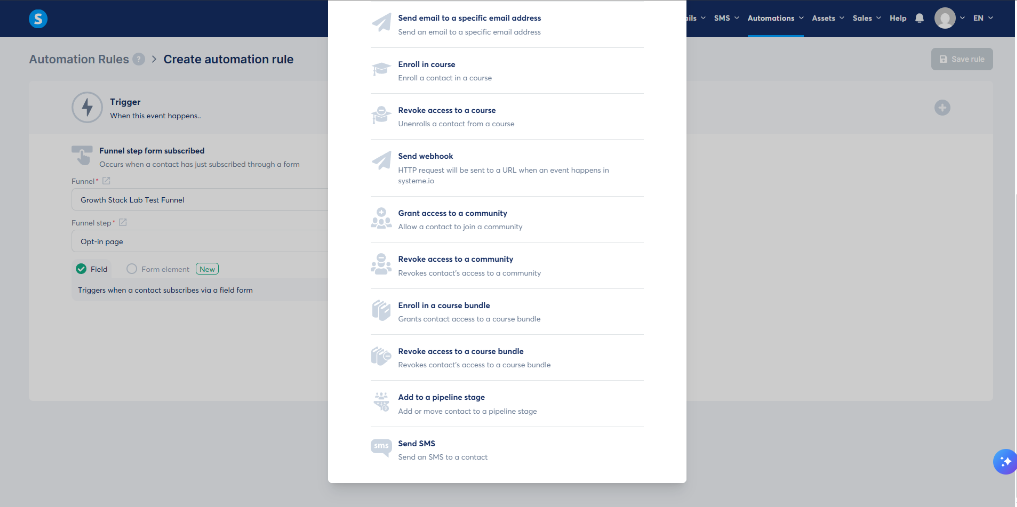
The automation trigger I tested after connecting it to my Systeme.io funnel.
Email Marketing Is Already Connected
Another important advantage is that leads collected through a Systeme.io funnel can remain inside the same platform for email follow-up.
Systeme.io’s email tools currently include broadcasts, automated sequences, tagging, segmentation, and unlimited email sends across its plans. Systeme.io email marketing features
That means a simple funnel does not need a separate email marketing integration just to function.
A visitor can submit an email address through the funnel and immediately enter an automated follow-up process.
For someone starting a one-person business, reducing integrations can significantly simplify the setup.
Can You Build a Sales Funnel on the Free Plan?
Yes.
Systeme.io’s Free plan includes funnel functionality, allowing you to build and test funnels without paying for a subscription first. Its current official sales-funnel page states that the Free plan includes three funnels. Systeme.io funnel features
That makes it possible to test a real funnel before deciding whether a paid plan is necessary.
This is particularly useful if you are still validating an offer.
You can create:
- A lead-generation funnel
- A basic sales funnel
- A simple product or course funnel
without immediately adding another monthly SaaS expense.
For a detailed look at the Free plan restrictions, see my Systeme.io Free Plan Limitations (2026) guide.
Systeme.io Funnel Builder vs ClickFunnels
This comparison is unavoidable because ClickFunnels is one of the best-known dedicated funnel platforms.
The two platforms approach the problem differently.
ClickFunnels focuses heavily on funnel-driven selling.
Systeme.io combines funnel building with a broader set of business tools such as email marketing, automation, courses, affiliate management, and websites.
Systeme.io also lets a solopreneur begin at $0, while ClickFunnels currently starts its paid funnel offering at a much higher monthly price point.
I covered the broader comparison here:
Systeme.io vs ClickFunnels (2026): Which Is Better for Solopreneurs?
The important question is not simply which funnel builder has more features.
It is which platform fits the complexity and budget of the business you are actually running.
A/B Testing and Funnel Optimization
Systeme.io offers A/B page testing as a documented feature. Systeme.io feature overview. I did not run a traffic experiment or measure a winning page in this review.
The official A/B setup guide, checked October 8, 2026, requires two variants and a goal page within the same funnel. It also says that page previews disable A/B logic, so previewing both designs does not verify traffic allocation.
For a future test, choose one change, such as the headline, and define the conversion goal before sending traffic. A working signup test alone cannot show which version converts better.
Funnel Analytics
The official funnel page lists page views, opt-in rates, and sales statistics. Systeme.io funnel features. This review did not validate those reports against an independent analytics source.
The lead magnet test confirmed a technical subscriber journey with one test contact. It did not measure audience conversion rates, revenue, or a conversion improvement. Use real visitor data to investigate drop-off after the pages, redirects, and delivery flow have been checked.
Who Is the Systeme.io Funnel Builder Best For?
I think it makes the most sense for:
- New solopreneurs
- Creators
- Freelancers
- Coaches
- Course creators
- Small online businesses
- Anyone trying to reduce the number of separate SaaS tools they use
The biggest advantage is not that Systeme.io has the most advanced funnel builder available.
It is that the funnel builder is connected to the rest of the business system.
For someone managing everything alone, that integration can be extremely valuable.
Who May Want Something More Advanced?
Systeme.io may not be the best fit if your business needs:
- Extremely complex funnel architecture
- Highly customized visual design
- Advanced enterprise CRM workflows
- Large teams with specialist marketing departments
- Very sophisticated funnel experimentation
In those situations, specialized tools may provide more control.
But those businesses also have very different needs from a new solopreneur.
What I Liked Most
The strongest evidence was that I could select a template, edit the landing page, add a thank-you step, and connect the form to an automation rule within the same platform.
The separate lead magnet test carried that small setup through one delivery email, PDF access, and unsubscribe. That supports using the builder for a basic signup flow; it does not establish how fast every funnel can be built or how well it will sell.
What I Liked Least
The setup still needed manual checking. Unrelated template content, the download button action, and the automation’s selected funnel step all needed attention in the lead magnet build.
The Free plan’s funnel, step, and A/B-test limits also matter as you expand. The capacity is enough to consider a small starting setup, but count your planned pages and variants before assuming it will cover a larger one.
Is the Systeme.io Funnel Builder Worth Using in 2026?
For a new or early-stage solopreneur, I think it is worth testing.
You can create a real funnel without writing code.
You can connect that funnel to email marketing.
You can automate follow-up.
You can test page variations.
And you can begin without paying for a funnel platform upfront.
That combination makes Systeme.io particularly attractive for someone who wants to validate a business before building an expensive software stack.
If you want my broader assessment of the platform rather than just its funnel builder, see:
Is Systeme.io Worth It in 2026? A Practical Review for Solopreneurs
The best way to decide whether the funnel builder fits your business is to create a simple funnel and test it yourself.
Affiliate disclosure: If you sign up through this link, Growth Stack Lab may earn a commission at no additional cost to you.