In this Systeme.io email marketing review, I look at whether one person can manage signup forms, newsletters, and email follow-up in the same account. The tools are worth considering if you already want Systeme.io for your funnels and need a straightforward email setup.
My hands-on evidence covers a verified sending domain and sender address, plus a lead-magnet flow with one automated delivery email, PDF access, and unsubscribe. The broader feature explanations below also draw on official documentation.
Growth Stack Lab has not configured or run the three-email welcome campaign described in our separate guide. The single-email result does not establish multi-email sequence timing or long-term inbox placement.
Affiliate disclosure: This article may contain affiliate links. If you sign up through one of these links, Growth Stack Lab may earn a commission at no additional cost to you.
Table of Contents
Quick Answer: Is Systeme.io Email Marketing Good?
Yes. Systeme.io supports one-time broadcasts, automated email sequences, and subscriber management. It is a practical option to evaluate when your signup funnel and email follow-up can share one account.
Choose the feature around the job you need it to do:
| Your email task | Feature to use | What to check |
|---|---|---|
| Send one announcement | Newsletter (broadcast) | Choose the tagged audience, check exclusions, and send now or schedule it. |
| Give each new subscriber a timed series | Campaign, with a rule to enroll the contact | Activate the email steps and check their order, delays, and enrollment trigger. |
| Deliver one email after a signup | Automation rule with a Send email action | Match the trigger to the correct form and test the delivery message. |
| Follow different paths according to a condition | Workflow | Plan its actions, delays, and Yes/No decisions before relying on the branches. |
| Organize subscribers for targeted messages | Contact tags | Define what each tag means and check the plan’s tag allowance. |
The distinctions above come from the official guides for newsletters, campaigns, automation rules, workflows, and contact tags, checked on October 8, 2026. The campaign and rule guides are linked in the relevant sections below.
The completed GSL sending test is the single-email delivery flow described below. The other rows summarize documented capabilities.
Systeme.io’s biggest advantage is not necessarily that its email tools are the most advanced available.
It is that they are already connected to the rest of the platform.
A person can subscribe through a funnel, enter the contact database, trigger an automation rule, and receive email follow-up without needing to connect several separate services. Systeme.io’s official email page describes exactly this integrated workflow. Systeme.io email marketing features
For a one-person business, that can be a meaningful advantage.
What Does Systeme.io Email Marketing Include?
Systeme.io combines several common email-marketing functions inside one account.
You can send one-time newsletters, create automated sequences, organize contacts with tags, segment audiences, and connect emails to actions that happen elsewhere in the platform.
The visual editor can be used for newsletters and campaigns, while a classic editor is available when you want a simpler text-based email. Systeme.io email editor guide
That gives a solopreneur two basic approaches.
You can send a broadcast when you have something to announce.
Or you can build an automated sequence that runs after a particular event.
For example, someone could subscribe through an opt-in page and automatically enter a welcome campaign.
That is the type of workflow I was most interested in testing.
My Email Setup Experience
The first part was more technical than writing an email.
Before sending branded email, I needed to configure my own domain and sender address.
For Growth Stack Lab, I used my existing domain and set up a branded sender rather than relying on a personal Gmail address.
This part required DNS configuration.
It was not difficult once the correct records were identified, but it was more technical than creating a newsletter or editing a funnel page.
The important point is that this is not merely cosmetic.
Systeme.io currently requires domain authentication for sending with a custom domain, and its documentation says the domain must be connected to an active website. Systeme.io domain authentication guide
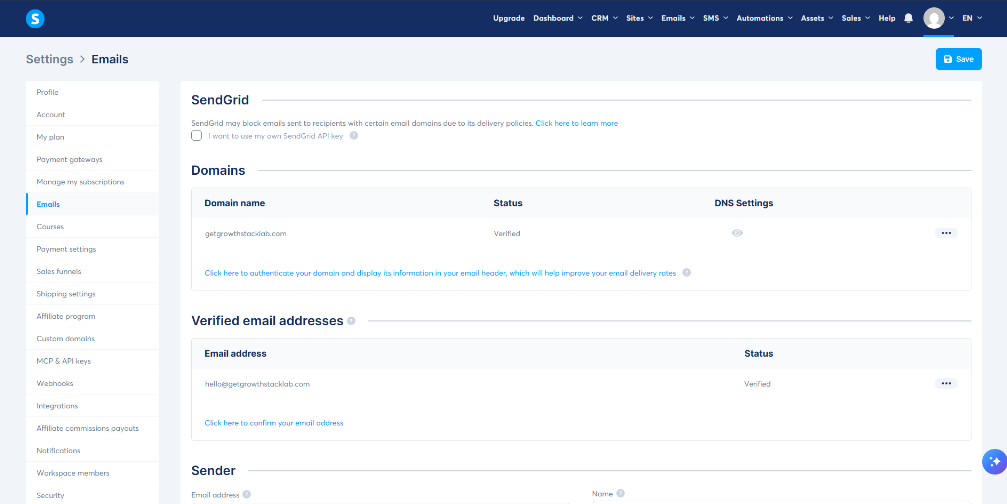
My custom domain and sender email after completing authentication in Systeme.io.
Setting Up a Custom Sending Domain
Domain authentication is one of the less glamorous parts of email marketing, but it matters.
Systeme.io generates DNS records that need to be added through the domain provider.
Its current documentation specifies three CNAME records plus a DMARC TXT record for domain authentication. Systeme.io domain authentication guide
In my case, once the DNS configuration was correct, the domain showed as verified inside Systeme.io.
My Systeme.io domain authentication guide documents the Namecheap DNS checks and the SPF, DKIM, and DMARC PASS results from one real Gmail delivery test.
This is one of those steps that a beginner may initially find intimidating.
But it is usually a one-time configuration.
Once it is done, the business can send using its own branded identity instead of a generic personal address.
For Growth Stack Lab, that makes much more sense than sending marketing emails from an unrelated personal inbox.
Verifying the Sender Email Address
Authenticating the domain is not the final step.
The sender email address also needs to be confirmed.
Systeme.io’s current process is straightforward: add the sender address in the email settings, receive the confirmation email, click the confirmation link, and the address should then appear as verified. Systeme.io sender verification guide
I used a branded Growth Stack Lab sender address for this test.
Once the sender was verified, I could use it for the email setup inside the platform.
This is a small detail, but it makes the email system feel much more like a real business setup than a temporary experiment.
Creating Email Campaigns
Systeme.io separates newsletters from campaigns.
A newsletter is useful for a one-time message.
A campaign is designed for a sequence of emails.
When creating a campaign, Systeme.io lets you define the campaign, choose the sender information, and then create individual email steps inside it. Systeme.io email campaign setup guide
Use a campaign when new subscribers should receive the same series in order. Each email needs to be activated, and later steps use the preceding email and a delay to control timing. Optional time-of-day or day-of-week conditions can postpone a send until all conditions are met.
For a small starting design, my Systeme.io welcome email sequence guide proposes three emails: deliver the resource, help the reader use it, and offer a relevant next step. It explains the sample timing and the checks needed before connecting an opt-in form.
That three-email campaign is a documentation-based proposal. Growth Stack Lab has not configured or tested it. Use it only for subscribers who agree to the stated follow-up, and verify the full sequence before relying on it.
Connecting Email Marketing to a Funnel
This is where Systeme.io becomes more compelling.
The email system does not sit separately from the funnel builder.
A visitor can enter through an opt-in form, and that event can trigger the next action automatically.
For example:
Visitor submits form → Contact enters Systeme.io → Automation fires → Contact joins campaign → Emails begin
Systeme.io officially supports Funnel step form subscribed as an automation trigger and Subscribe to campaign as an action. Systeme.io campaign automation guide
I had already created a test funnel, so this connection was particularly useful.
Instead of exporting an email address from one service and importing it into another, the funnel and email system can work together.
If you want to see how I built and tested the funnel side itself, read my:
Systeme.io Funnel Builder Review (2026): Is It Good Enough for Solopreneurs?
Testing Email Automation
Automation is probably the feature that gives the email tools the most practical value.
A trigger tells Systeme.io that something has happened.
An action tells it what to do next.
For example, Systeme.io supports automatically sending an email when someone subscribes through a funnel form. Systeme.io automatic welcome email guide
In my complete lead magnet workflow test, a form submission triggered one delivery email. The message reached my Gmail inbox, the PDF link opened correctly, and I verified the unsubscribe process in Systeme.io.
That is the completed email journey documented here. It does not verify a multi-email campaign’s timing, every workflow branch, or delivery to a larger list.
For the trigger and execution controls behind these features, read my Systeme.io automation review. It separates rules from workflows and distinguishes setup evidence from a completed run.
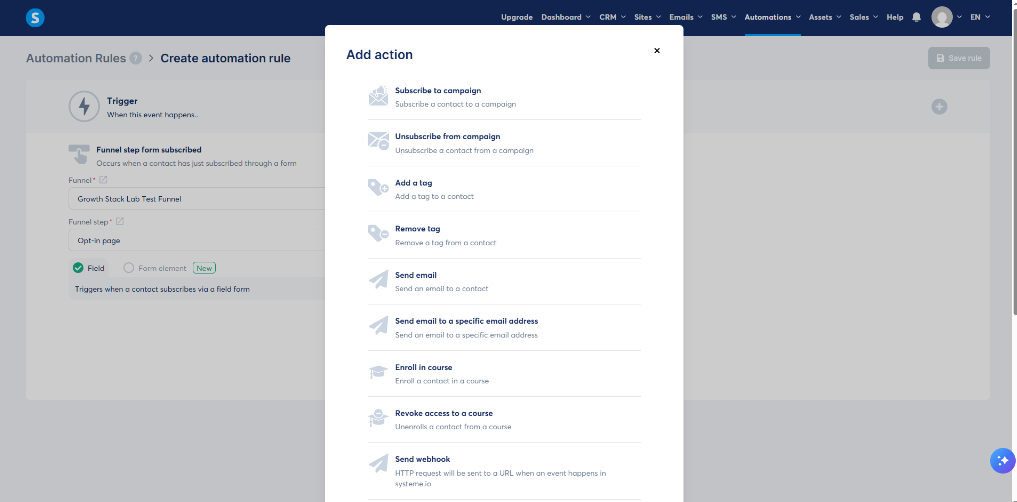
The automation trigger I used to connect a funnel subscription with email follow-up.
What I Like Most About Systeme.io Email Marketing
The strongest point is integration.
If I were using separate tools, I might need one service for funnels and another for email marketing.
Then I would need to connect them.
With Systeme.io, the contact, funnel, email campaign, automation, and other business tools can remain inside one system.
That reduces the number of moving parts.
This Systeme.io email marketing review showed me that the platform’s biggest strength is how closely email, funnels, and automation work together.
For a large marketing team, this may not matter as much.
For one person trying to run the entire business, it can matter a lot.
Unlimited Email Sending on the Free Plan
The Free plan supports up to 2,000 contacts with unlimited email sends. Systeme.io email marketing features
The official pricing comparison, checked on October 8, 2026, also lists one email campaign, one automation rule, one workflow, and one tag on Free. Newsletters are listed as unlimited. Use the detailed comparison and your account’s available capacity when planning the setup.
One campaign can contain several email steps. For a first welcome series, check that its campaign and enrollment rule fit alongside anything already running. Unlimited sending does not remove those setup limits or provide room for several independent tagged audiences.
For a deeper look at where the Free plan becomes restrictive, see:
Systeme.io Free Plan Limitations (2026): What Can You Actually Do for Free?
Email Editor: Simple Rather Than Overwhelming
Systeme.io currently provides both a visual drag-and-drop editor and a classic editor.
The visual editor allows content and layout blocks to be arranged visually and includes desktop/mobile preview options. Systeme.io email editor guide
That should be enough for many normal newsletters and marketing messages.
Personally, I do not think email design needs to be complicated for most solopreneurs.
A clear message, readable layout, useful content, and one obvious next action are often more important than an elaborate design.
The trade-off is that dedicated email platforms may offer deeper design customization or broader third-party integrations.
Systeme.io itself acknowledges that specialist competitors can provide more advanced email-design and integration options. Systeme.io email marketing features
Email Analytics
Sending email is only useful if you can see what happens afterward.
Systeme.io provides statistics around email performance, including opens and clicks, and its email marketing page also describes sales tracking inside the email dashboard. Systeme.io email marketing features
For a new solopreneur, the basic questions are usually enough:
Did people open the email?
Did they click?
Did they unsubscribe?
Which messages performed better?
You do not necessarily need an enterprise analytics suite to answer those questions.
Where Systeme.io Email Marketing Feels More Limited
Systeme.io’s biggest strength can also be its limitation.
It is designed as an all-in-one business platform.
It is not exclusively an email-marketing product.
If your entire business depends on highly sophisticated email segmentation, extremely complex lifecycle automation, advanced template design, or a very large ecosystem of third-party integrations, a specialized email platform may eventually make more sense.
That does not make Systeme.io unsuitable for email marketing.
It means the right choice depends on the complexity of the business.
For a new solo operator, the simplicity may be a benefit.
For an advanced email-first business, it may eventually feel restrictive.
For email-focused alternatives, see my Systeme.io vs Brevo and Systeme.io vs Mailchimp comparisons.
Email Deliverability Still Depends on Your Setup
No email platform can guarantee that every email will reach the inbox.
Domain authentication, sender reputation, consent, list quality, and engagement all matter.
Systeme.io specifically recommends authenticated sending domains and warns against sending to contacts who have not given permission. Its deliverability guidance also stresses sender authentication and maintaining an engaged contact list. Systeme.io deliverability guidance
That is worth remembering.
A good email tool cannot fix poor sending practices.
If an expected message is missing, start with the Systeme.io email troubleshooting checklist. It helps you distinguish an email that was never triggered or is still waiting from one that reached Spam or another inbox tab.
Is Systeme.io Email Marketing Worth Using in 2026?
For a new solopreneur already considering Systeme.io for funnels or automation, I think its email marketing tools are one of the strongest reasons to test the platform.
You can collect leads.
Send newsletters.
Build automated sequences.
Segment contacts.
Connect those contacts to funnels and automation.
And start with up to 2,000 contacts and unlimited sending on the Free plan.
The biggest benefit is not any one feature.
It is that those features work inside the same system.
That can keep a small business simpler during the stage when simplicity matters most.
Overall, this Systeme.io email marketing review suggests that the platform is a strong fit for solopreneurs who value simplicity and integration.
If you want my broader assessment of the whole platform, see:
Is Systeme.io Worth It in 2026? A Practical Review for Solopreneurs
And if you want to compare the available plans:
Systeme.io Pricing (2026): Which Plan Is Right for Solopreneurs?
The simplest way to decide is to test the email tools with a small list, connect them to a basic funnel, and see whether the workflow fits the way you want to run your business.
Affiliate disclosure: If you sign up through this link, Growth Stack Lab may earn a commission at no additional cost to you.