Check Systeme.io domain authentication in two places: the DNS records for your sending domain and the authentication results of a delivered test email. A Verified badge alone does not show what the receiving mailbox saw.
I checked the domain authentication status inside Systeme.io, compared the DNS records it requested with the records actually stored at Namecheap, sent a real email through Systeme.io, and then inspected the message inside Gmail.
The final Gmail result showed: SPF: PASS, DKIM: PASS, DMARC: PASS.
That does not prove perfect deliverability or guarantee inbox placement for every future email. It does, however, confirm that the authentication setup used in this test was recognized successfully by Gmail.
In this guide, I will show you what Systeme.io asked me to configure, what I found in my DNS settings, what Gmail actually reported, and which settings I deliberately did not change.
Affiliate disclosure: This article may contain affiliate links. If you sign up or purchase through one of these links, Growth Stack Lab may earn a commission at no additional cost to you.
1. What Domain Authentication Does
When you send marketing email using your own domain, receiving email providers need a way to evaluate whether the message is legitimately associated with that domain.
Three technologies commonly appear in this process: SPF, DKIM, and DMARC. They solve related but different problems.
SPF
SPF allows a domain to publish information about which sending infrastructure is permitted to send mail on its behalf. The SPF result is evaluated against the domain used in the SMTP envelope, often called the Return-Path or MAIL FROM domain.
DKIM
DKIM adds a cryptographic signature to the message. The receiving server can retrieve the corresponding public key from DNS and verify that the signature is valid.
DMARC
DMARC builds on SPF and DKIM. It checks whether authenticated domains align appropriately with the domain shown to the recipient in the visible From address.
For my test, the visible sender was hello@getgrowthstacklab.com. The goal was not simply to see a green “Verified” badge inside Systeme.io. I wanted to confirm what Gmail saw after an actual message was delivered.
For the broader email feature set, read my Systeme.io Email Marketing Review.
2. Systeme.io’s Current Domain Authentication Requirements
Systeme.io currently instructs users to authenticate a custom domain before sending email from that domain. Its setup process generates three CNAME records and one TXT record for DMARC.
Systeme.io also states that the authenticated domain should point to an active website rather than an error page. It does not support authenticating personal email-provider domains such as Gmail, Yahoo, or ProtonMail as your sending domain.
Use the official Systeme.io domain authentication guide alongside the records generated in your own account.
I used getgrowthstacklab.com as the domain and hello@getgrowthstacklab.com as the sender. Growth Stack Lab already had a functioning website on the domain, so I did not need to create a separate website simply for authentication.
3. My Starting Point: The Domain Was Already Verified
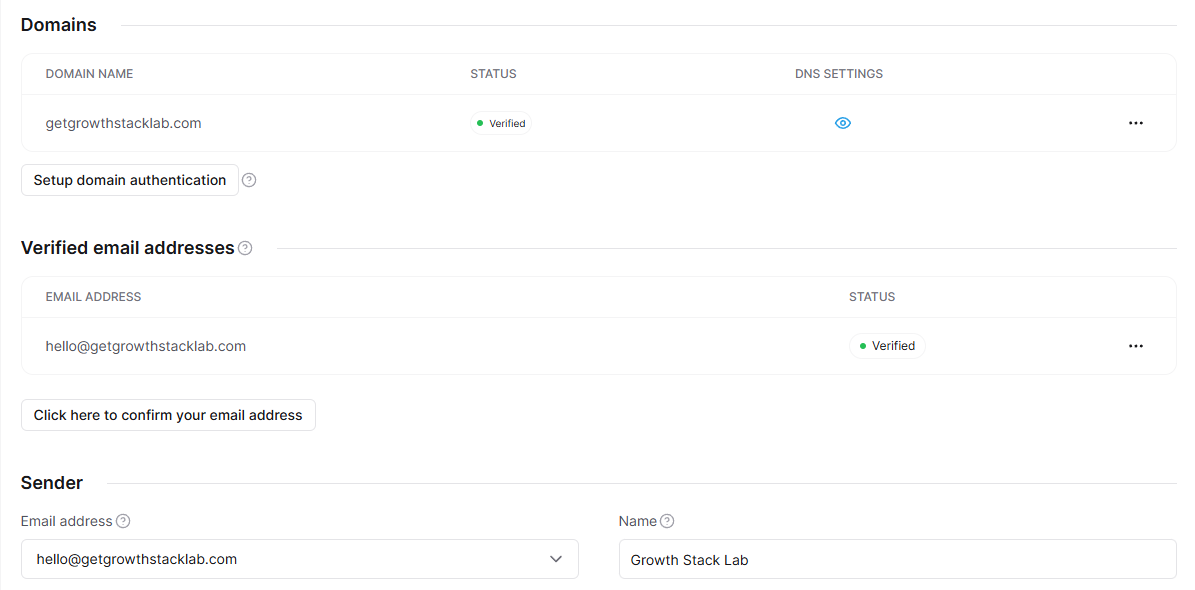
When I began this test, I expected that I might need to configure authentication from scratch. Instead, I discovered that the domain had already been authenticated.
Inside Systeme.io, getgrowthstacklab.com showed Verified. The sender address hello@getgrowthstacklab.com also showed Verified.
That changed the purpose of the experiment. Rather than adding new DNS records, I decided to verify whether the existing records actually matched what Systeme.io required.
This is an important distinction. A status screen tells you what the platform currently believes. Checking the DNS zone lets you confirm what is actually configured.
4. The DNS Records Systeme.io Requested
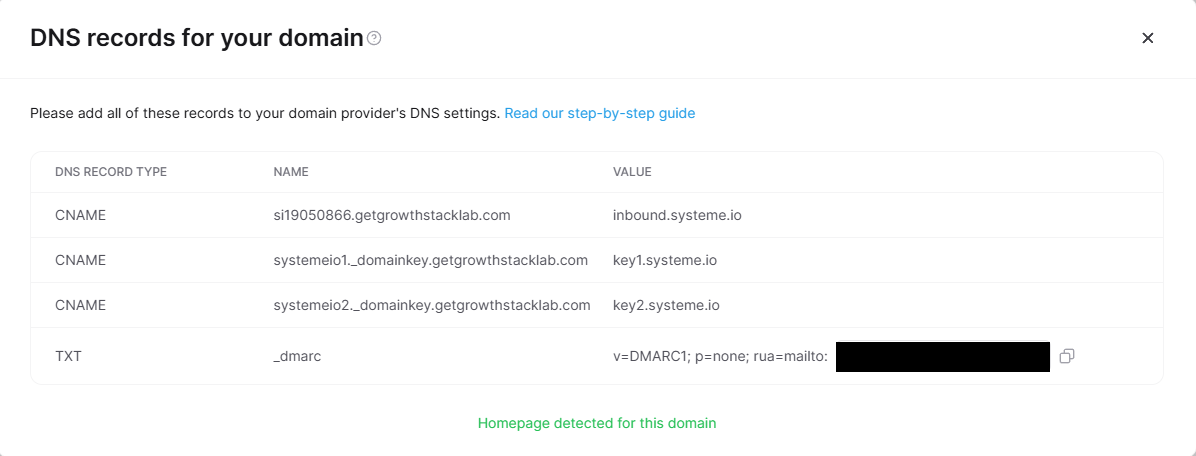
I opened the DNS settings panel for the authenticated domain. Systeme.io displayed four records. For my account, the structure was:
| Type | Purpose |
|---|---|
| CNAME | Systeme.io sending / return-path subdomain |
| CNAME | DKIM selector 1 |
| CNAME | DKIM selector 2 |
| TXT | DMARC policy |
The generated values can differ between accounts or domains, so copy the records generated inside your own Systeme.io account rather than reuse values from another website.
In my case, the three CNAME destinations pointed to Systeme.io infrastructure, including inbound.systeme.io, key1.systeme.io, and key2.systeme.io.
The TXT record was a DMARC record beginning with v=DMARC1; p=none;.
A privacy note about DMARC screenshots
My DMARC record also contained a reporting address after rua=mailto:. I would not publish that private reporting address in a public tutorial.
If you use a screenshot in your own documentation, hide any private email address, tracking identifier, or account-specific value that readers do not need.
5. Checking the Same Records in Namecheap
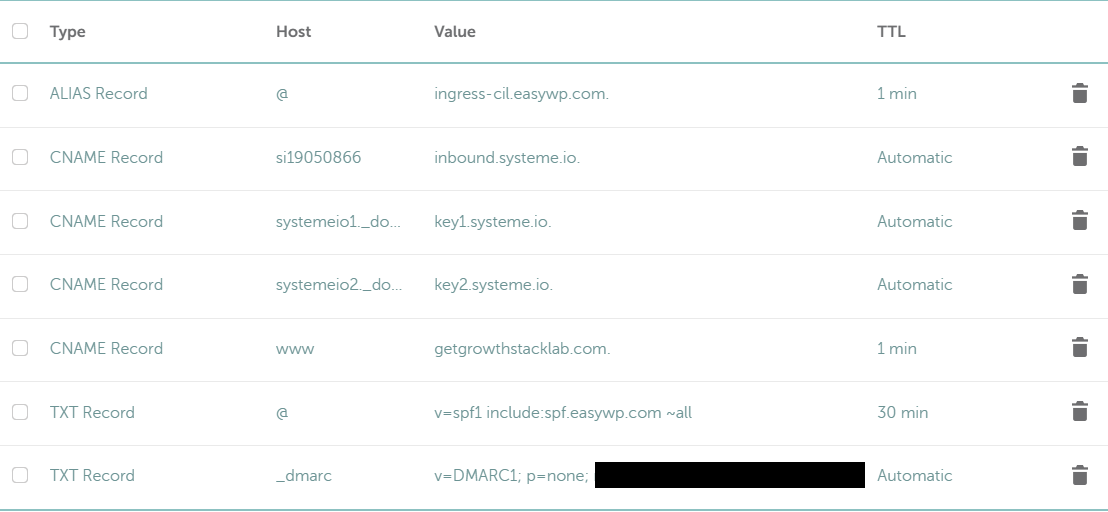
Growth Stack Lab uses Namecheap to manage the domain’s DNS records. I opened Domain List → Advanced DNS and compared the live DNS entries against the values displayed by Systeme.io.
The three authentication CNAME records were present. The destinations matched the corresponding Systeme.io values. I then expanded the remaining records and confirmed that the _dmarc TXT record was also present.
This gave me a much stronger verification chain: Systeme.io requested records → actual Namecheap DNS records → match. No DNS changes were required.
6. I Did Not Add Systeme.io to the Root SPF Record
While reviewing the DNS zone, I noticed another TXT record. The root domain had an SPF record associated with the existing web/email setup.
At first glance, someone might assume that Systeme.io must be manually added to that SPF record. I did not make that change. Instead, I decided to inspect a real email first.
That was the safer approach because SPF is evaluated using the SMTP envelope domain, which does not necessarily have to be the same as the visible From domain.
Changing an existing SPF record without understanding the actual sending path can create a new problem while trying to solve one that may not exist. The Gmail test later confirmed that this message passed SPF with the existing root SPF record unchanged.
7. Sending a Real Test Email Through Systeme.io
For the next step, I used the lead magnet workflow I had already built for Growth Stack Lab. The workflow sends Your One-Person Business Tool Stack Checklist from Growth Stack Lab <hello@getgrowthstacklab.com> to a subscriber after an opt-in form is submitted.
I submitted a test registration and received the message in Gmail. The email arrived successfully. However, receiving an email does not by itself prove that SPF, DKIM, and DMARC passed.
So I opened Gmail’s original-message view to inspect the authentication results.
If you want to see how the full lead magnet workflow was built and tested, read my Systeme.io lead magnet funnel guide. My Systeme.io Automation Review covers rules and workflows in more detail.
8. Gmail Reported SPF: PASS
Gmail displayed SPF: PASS. The full header showed that the Return-Path used a subdomain under si19050866.getgrowthstacklab.com. The sending IP was associated with Systeme.io’s mail infrastructure.
This detail explains why I did not need to force a Systeme.io include into the root-domain SPF record simply because I did not see it there.
In this particular configuration, Gmail successfully authenticated the actual envelope-sender path used by Systeme.io.
That is an important lesson: Do not diagnose SPF only by looking at the visible From address. Check the actual message header and Return-Path.
9. Gmail Reported DKIM: PASS
The DKIM result was especially useful. Gmail reported a successful DKIM authentication for getgrowthstacklab.com. The message also contained another valid DKIM signature associated with Systeme.io infrastructure, inbound.systeme.io.
For the purposes of this test, the important result was that Gmail successfully validated a DKIM signature using my own sending domain. That gave me direct evidence that the DKIM records configured through Systeme.io were functioning in the delivered message.
10. Gmail Reported DMARC: PASS
Gmail also reported DMARC: PASS. The full authentication result referenced header.from=getgrowthstacklab.com.
That matters because DMARC is concerned with alignment between the visible From domain and authenticated identities. In my test, Gmail accepted that alignment.
The DMARC record used p=none during this test. This is a monitoring policy. I did not change it to quarantine or reject during the experiment.
Those policies can affect legitimate mail if your sending ecosystem has not been audited carefully. Changing DMARC enforcement would be a separate decision, not something I would do simply to make a tutorial look more secure.

11. My Actual Authentication Test Results
Here is the complete result from this experiment.
| Test | Actual result |
|---|---|
| Systeme.io domain status | Verified |
| Sender email status | Verified |
| Required CNAME records | Present in Namecheap |
| DMARC TXT record | Present in Namecheap |
| DNS values matched Systeme.io | Yes |
| Test email sent | Yes |
| Gmail receipt | Successful |
| SPF | PASS |
| DKIM | PASS |
| DMARC | PASS |
| Long-term deliverability | Not tested |
| Outlook/Yahoo authentication | Not tested |
| Real subscriber performance | Not tested |
That final group of “Not tested” items is important. One Gmail test is evidence of one successful authentication path. It is not proof of universal deliverability.
12. Expected vs Actual vs Fix
I use an Expected / Actual / Fix framework for Growth Stack Lab tests so that setup work does not get confused with verified results.
Domain authentication
Expected: Add the DNS records requested by Systeme.io and obtain a Verified status.
Actual: The domain was already Verified. The requested records were already present in Namecheap and matched Systeme.io.
Fix: None.
Sender verification
Expected: Verify the sender address before using it for email.
Actual: hello@getgrowthstacklab.com was already Verified.
Fix: None.
SPF
Expected: A test email should pass SPF.
Actual: Gmail reported SPF PASS.
Fix: None. I did not modify the root SPF record.
DKIM
Expected: A message from the custom domain should contain a DKIM signature that Gmail can validate.
Actual: Gmail reported DKIM PASS for getgrowthstacklab.com.
Fix: None.
DMARC
Expected: The visible From domain should pass DMARC alignment.
Actual: Gmail reported DMARC PASS.
Fix: None.
13. Common Mistakes to Avoid
This test highlighted several mistakes worth avoiding.
Mistake 1: Treating “Verified” as the only proof you need
The platform status is useful, but a receiving mailbox can tell you what happened to a real delivered message. Check both.
Mistake 2: Copying someone else’s DNS records
The authentication records generated for one account may not belong to another. Always use the values shown inside your own Systeme.io account.
Mistake 3: Editing SPF before checking the Return-Path
The visible From address is not the only domain involved in SPF. Inspect the real message first.
Mistake 4: Assuming authentication guarantees inbox placement
SPF, DKIM, and DMARC are important authentication mechanisms. They do not guarantee that every message will reach the inbox.
Sender reputation, engagement, content, complaint rates, list quality, sending patterns, and provider policies can also affect delivery.
Mistake 5: Strengthening DMARC without auditing your mail sources
Moving from p=none to stronger enforcement can be useful in the right environment. It can also block legitimate mail if another service sends on behalf of your domain without correct authentication. Do not change DMARC enforcement casually.
14. Does Systeme.io Domain Authentication Improve Deliverability?
Authentication is an important part of modern email delivery, but I would not describe it as a guarantee. Systeme.io itself recommends authenticating the sending domain as part of its deliverability guidance.
Google’s email sender guidelines also require email authentication for Gmail senders, with additional requirements applying to higher-volume senders.
For Growth Stack Lab, the useful conclusion from this test is narrower: The Systeme.io authentication configuration I tested was accepted by Gmail, with SPF, DKIM, and DMARC all returning PASS.
That is a meaningful technical result. It is not a conversion-rate result, a long-term inbox-placement study, or proof that another provider will make the same decision.
If authentication passes but an expected email is still missing, use the Systeme.io emails-not-sending checklist to check the trigger, campaign timing, contact status, and any sending hold before changing working DNS records.
15. Is Domain Authentication Difficult With Namecheap?
In my case, no new configuration was required because the records were already present.
If you are setting it up from scratch, follow the official Systeme.io Namecheap authentication guide. The process is conceptually simple:
- Open Systeme.io’s Email settings.
- Add your custom domain for authentication.
- Display the generated DNS records.
- Open Namecheap’s Advanced DNS settings.
- Add the requested CNAME records.
- Add the DMARC TXT record if required, checking for an existing policy first.
- Wait for DNS propagation and Systeme.io verification.
- Confirm the sender email address.
- Send a real test message.
- Inspect the receiving mailbox’s authentication results.
The DNS part is only half of the process. The final test is what tells you whether your real message was accepted with the expected authentication results.
Frequently Asked Questions
Do I need to authenticate my domain to send email with Systeme.io?
Systeme.io currently requires domain authentication when using your own custom domain for email sending. You should follow the records generated inside your own account because authentication values can differ between domains or accounts.
What DNS records does Systeme.io use for domain authentication?
In the configuration I checked, Systeme.io generated three CNAME records and one TXT record for DMARC. The exact hostnames should be copied from your own Systeme.io account.
Does Systeme.io support DKIM?
Yes. In my Gmail test, a message sent through my authenticated Systeme.io setup returned DKIM PASS for getgrowthstacklab.com.
Does Systeme.io support SPF?
My test email returned SPF PASS. The actual SPF evaluation used the message’s Return-Path subdomain, which is why I checked the delivered message instead of changing my root SPF record based on assumptions.
Does DMARC need to be set to reject?
No. The configuration I tested used p=none, and Gmail returned DMARC PASS for that message. Choosing none, quarantine, or reject is a broader domain-security decision and should account for every legitimate service that sends mail using your domain.
Does passing SPF, DKIM, and DMARC guarantee inbox delivery?
No. My test proves that Gmail accepted the authentication for this message. It does not prove universal inbox placement or long-term deliverability.
Final Thoughts
The most useful part of this experiment was not seeing a green Verified badge inside Systeme.io. It was tracing the complete authentication chain.
Systeme.io showed the domain as Verified. The required DNS records were present in Namecheap. A real message was sent from hello@getgrowthstacklab.com. Gmail then reported SPF: PASS, DKIM: PASS, DMARC: PASS.
That is the level of verification I would want before describing an email authentication setup as successfully tested.
If you are configuring Systeme.io for your own business, copy the DNS values from your account carefully, confirm your sender address, and send a real test message before relying on the setup for an audience.
Before choosing a plan, read my Systeme.io Free Plan Limitations guide.
Want to test Systeme.io yourself?
Explore Systeme.io’s Free plan and verify the full email-sending workflow with your own domain before using it for a live list.