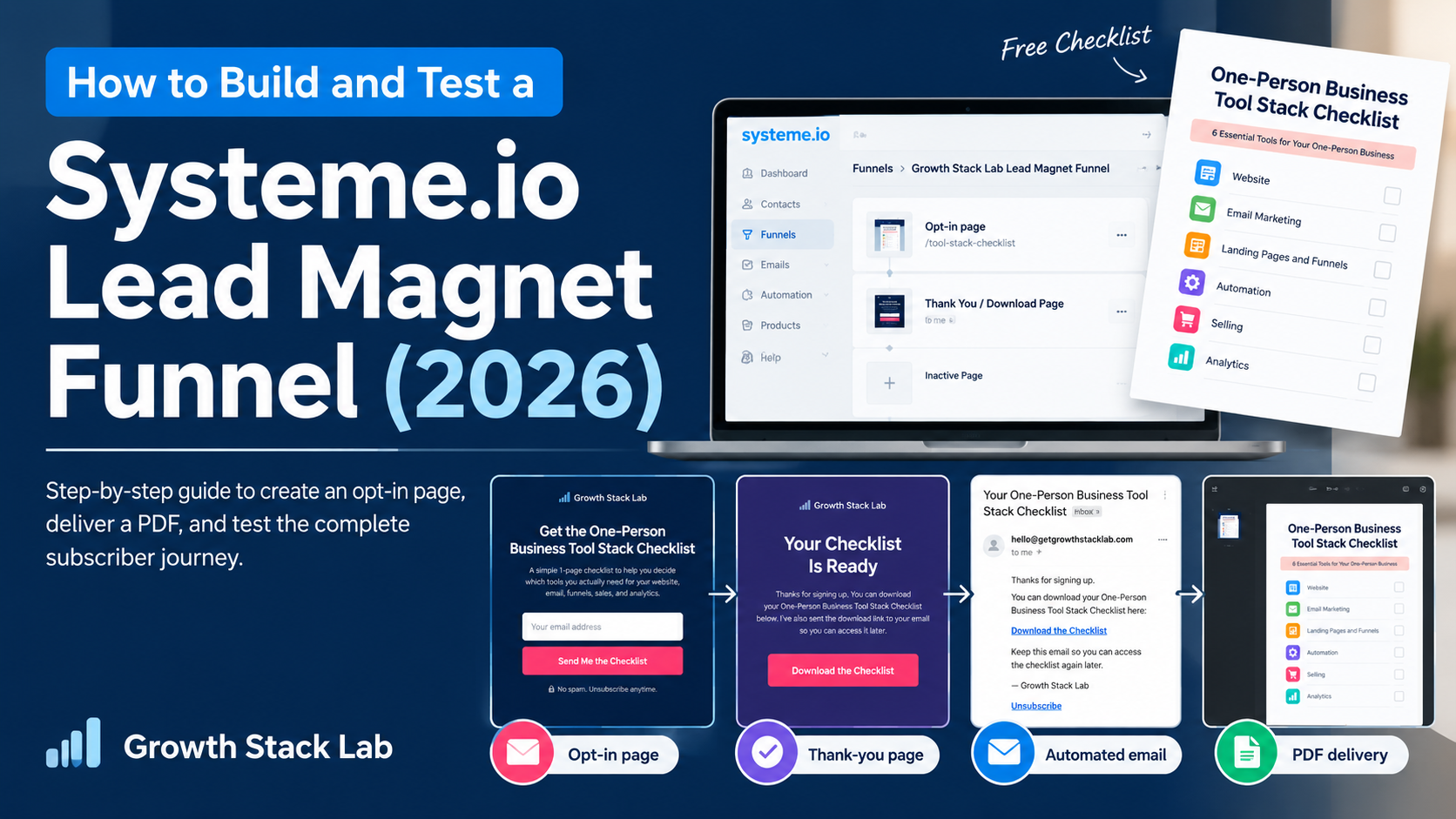
Building a lead magnet funnel is one thing. Making sure the entire subscriber journey actually works is another.
In September 2026, I built a complete Systeme.io lead magnet funnel for Growth Stack Lab and tested it using a separate email address.
My goal was simple: create a one-page PDF, collect an email address, deliver the resource automatically, and verify that subscribers could unsubscribe.
I wanted to test the process rather than assume that a correctly configured automation would work.
The result? My test registration successfully reached the thank-you page, triggered an automated email, and delivered the PDF through a working download link. I also completed the unsubscribe process and checked the contact’s updated status inside Systeme.io.
In this guide, I’ll walk through exactly what I built, how I configured each step, what I tested, and what I learned.
Affiliate disclosure: This article may contain affiliate links. If you sign up or purchase through one of these links, Growth Stack Lab may earn a commission at no additional cost to you.
Table of Contents
1. What I Built: A Simple Lead Magnet Funnel
A lead magnet is a free resource offered in exchange for a visitor’s contact information.
It might be a checklist, template, short guide, worksheet, or another useful resource.
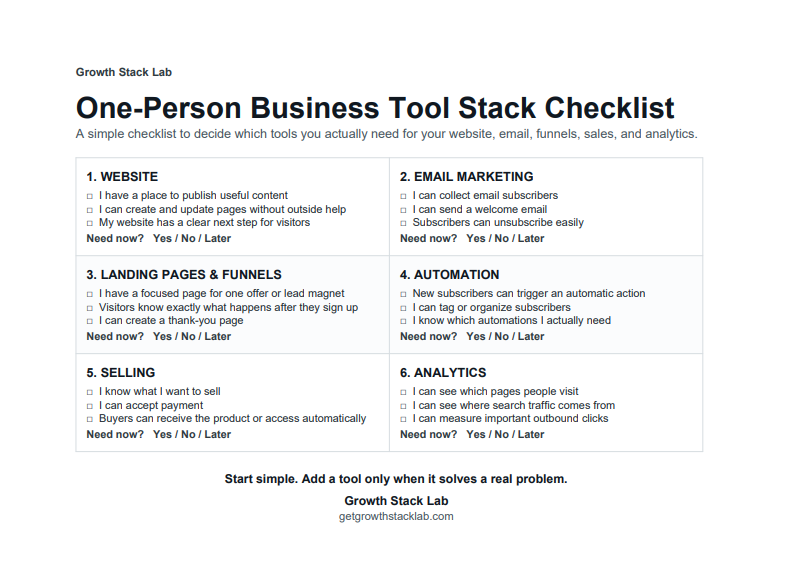
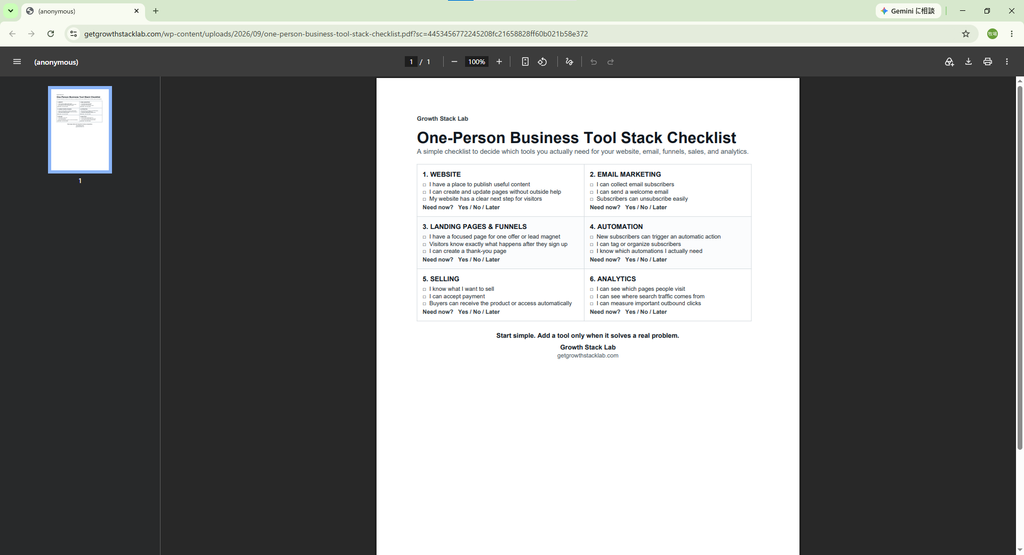
For this experiment, I created a one-page PDF titled:
One-Person Business Tool Stack Checklist
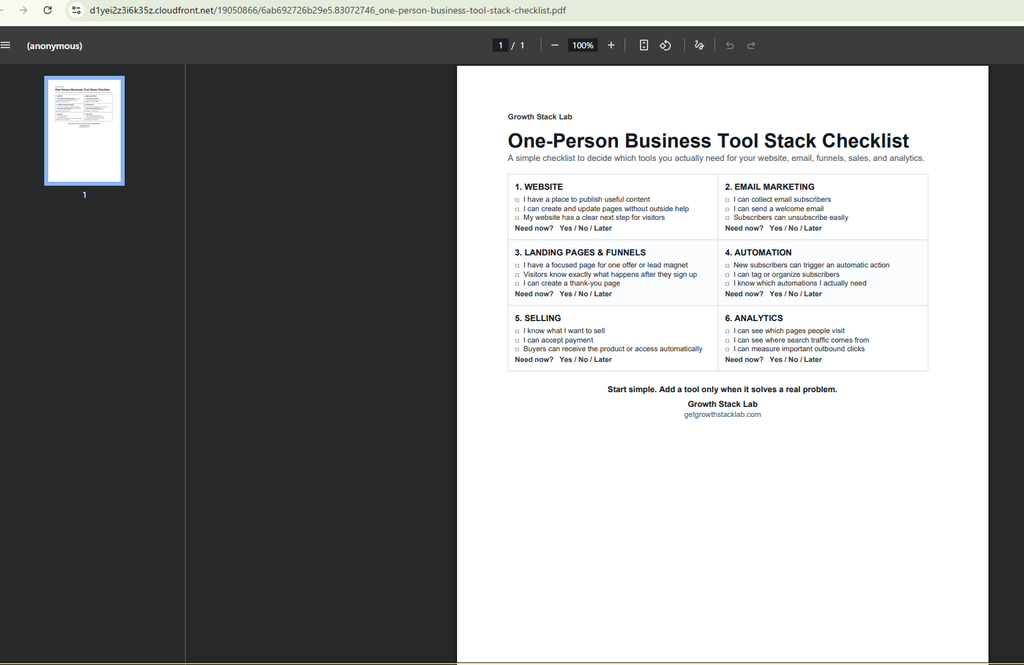
The checklist helps solopreneurs review six areas of their business:
- Website
- Email marketing
- Landing pages and funnels
- Automation
- Selling
- Analytics
Each section contains practical questions to help readers identify which tools they need now and which can wait.
Rather than creating a complicated lead magnet, I deliberately kept the resource short and useful.
The resulting funnel had a straightforward structure:
Opt-in page → Thank-you page → PDF download
An automation rule also sent a separate delivery email, allowing subscribers to access the resource later.
That gave me two delivery methods to test: the thank-you page and the email.
Want the checklist used in this walkthrough? Get Growth Stack Lab’s free One-Person Business Tool Stack Checklist to review your website, email, funnels, sales, and analytics needs.
2. What You Need Before Starting
For this particular Systeme.io lead magnet funnel, I used:
- A Systeme.io account
- A downloadable PDF
- An email address for sending the resource
- A separate email address for testing
- One opt-in page
- One thank-you page
- One automation rule
No coding was necessary for the funnel configuration I tested.
If you are still deciding which plan to use, see my Systeme.io pricing breakdown.
The Free plan provides access to the core features needed for this type of experiment, although its resource limits should be checked before building multiple funnels or automations.
I used a free account for the experiment described here.
3. Create Your Lead Magnet PDF
Before opening the funnel builder, I prepared the downloadable resource.
The goal was to create something that could be understood and used within a few minutes.
My checklist was divided into six business functions, with simple questions and space to decide whether a tool was needed immediately.
I exported the document as a single-page PDF.
The file was named:
one-person-business-tool-stack-checklist.pdf
I also uploaded a copy to the Growth Stack Lab WordPress Media Library. This gave me a publicly accessible PDF URL that I could use in the delivery email.
One important distinction: a publicly accessible PDF link is not a protected download. Someone with the URL may be able to open it without submitting the opt-in form.
For this free educational resource, that was acceptable. If you need restricted access, use a delivery method designed for protected content.
4. Create a Funnel in Systeme.io
After preparing the PDF, I opened Systeme.io and navigated to the sales funnel section.
I clicked Create and entered a descriptive name:
Growth Stack Lab Lead Magnet Funnel
Systeme.io presented several funnel goals, including building an audience, selling a product, creating a custom funnel, and running an evergreen webinar.
For this experiment, I selected Build an audience.
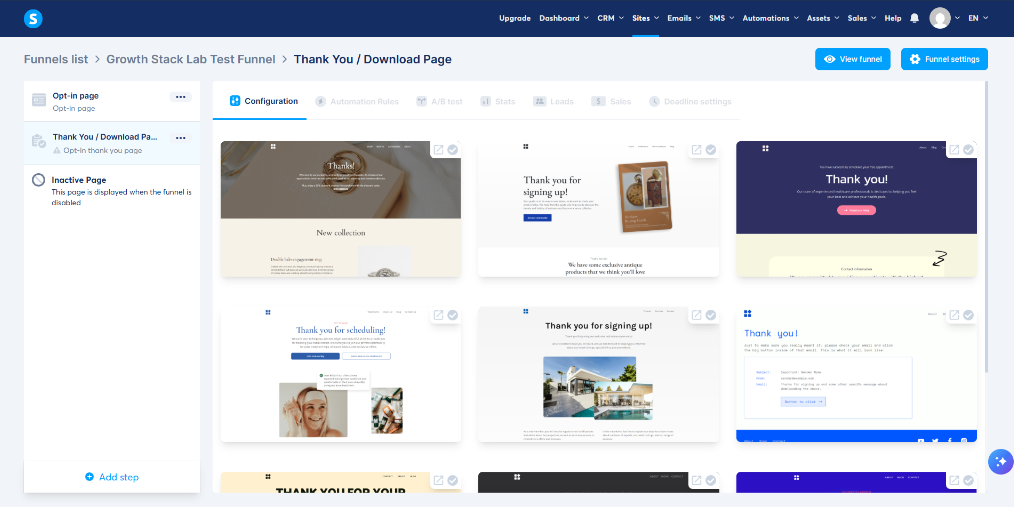
That option created the basic funnel structure I needed: an opt-in step followed by a thank-you step.
I did not need a checkout page because I was giving away a free checklist, not selling a product.
If you want a closer look at the funnel builder itself, check Systeme.io’s official documentation.
5. Customize the Opt-in Page
Next, I selected the Opt-in page and opened the page editor.
I started with an available template and removed elements that did not belong in the lead magnet experience.
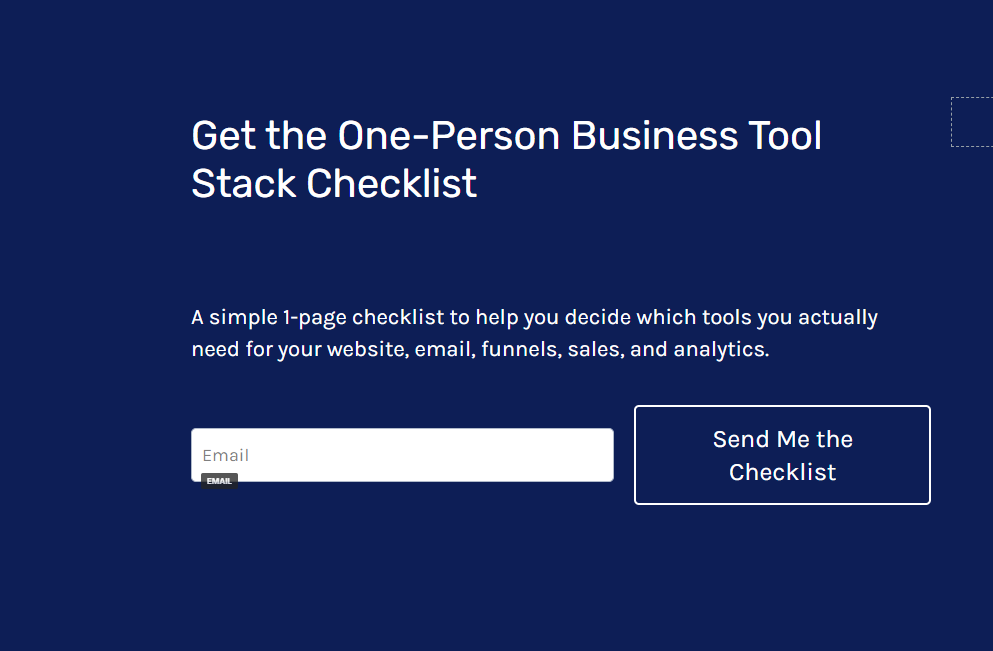
The final version used a dark navy background, a headline, short supporting text, an email field, and one primary button.
Headline
Get the One-Person Business Tool Stack Checklist
Supporting Copy
A simple 1-page checklist to help you decide which tools you actually need for your website, email, funnels, sales, and analytics.
CTA Button
Send Me the Checklist
I intentionally kept the page focused on one action: submitting an email address.
An unnecessary navigation menu, unrelated images, or additional calls to action would make the purpose less clear.
I also replaced the original random URL path with:
tool-stack-checklist
This made the public link easier to recognize and reuse.
For the form submission button, the important setting is the submission action. In my configuration, submitting the form saved the contact and moved the visitor to the next funnel step.
This behavior was subsequently verified during the live test.
6. Build the Thank-you and Download Page
The second step was the thank-you page.
I selected a template with a prominent headline and central button, then replaced the original template content with messaging relevant to the checklist.
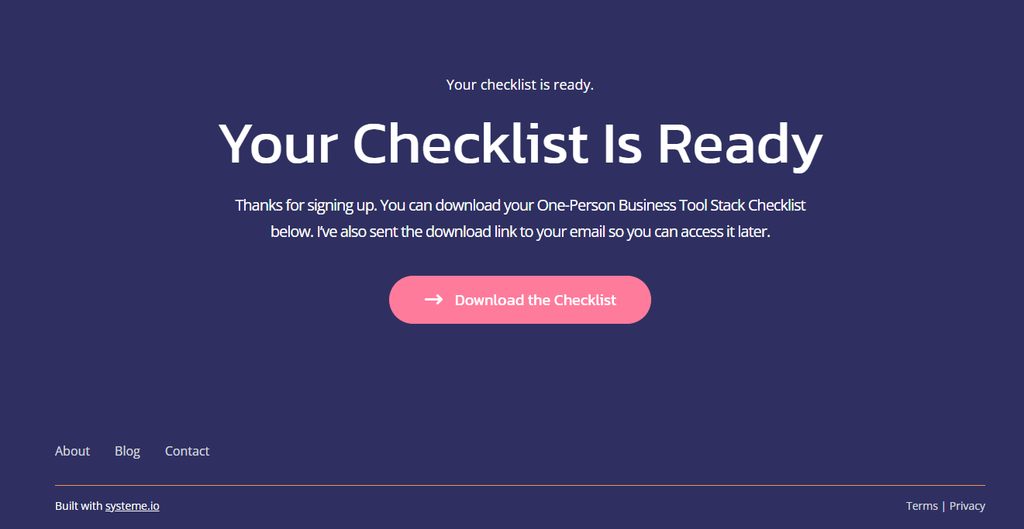
The final page contained:
Main Heading
Your Checklist Is Ready
Description
Thanks for signing up. You can download your One-Person Business Tool Stack Checklist below. I’ve also sent the download link to your email so you can access it later.
Download Button
Download the Checklist
Initially, I configured the button using an external PDF URL.
I later switched the button action to Download file and uploaded the PDF directly into Systeme.io.
This allowed the button to serve the file through Systeme.io rather than depend on the WordPress Media Library URL.
During testing, I confirmed that the PDF opened successfully from the live thank-you page.
This was an important distinction because a button that looks correct inside an editor has not necessarily been verified in the live funnel.
7. Create the Automated Delivery Email
The thank-you page provided immediate access to the checklist, but I also wanted subscribers to receive the resource by email.
This meant they could return to the file without revisiting the original funnel.
I created a simple email with the following settings:
| Setting | My Configuration |
|---|---|
| Sender name | Growth Stack Lab |
| Sender address | hello@getgrowthstacklab.com |
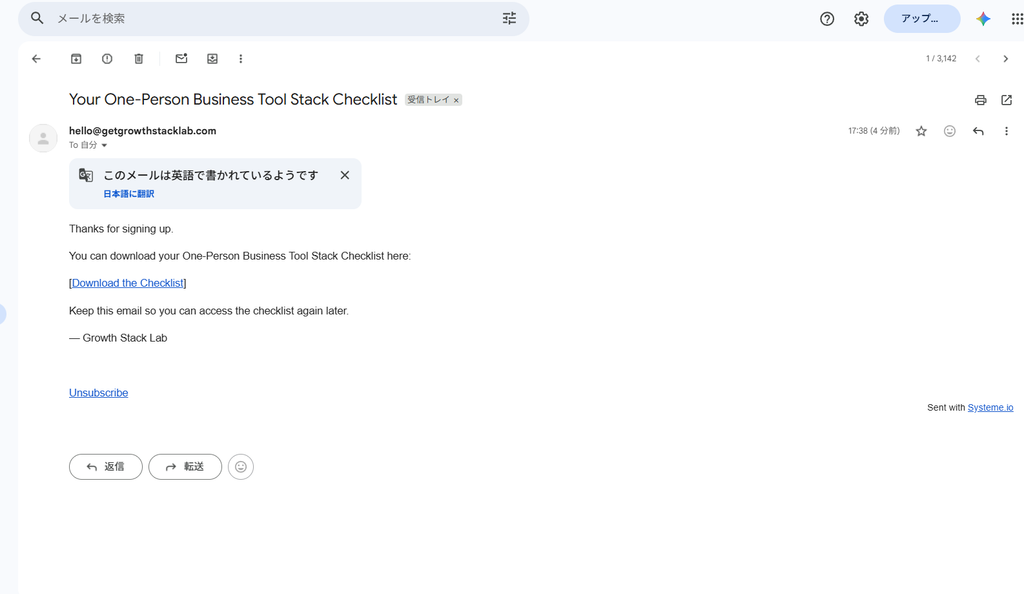
| Subject | Your One-Person Business Tool Stack Checklist |
| Delivery method | Download link |
The email itself was intentionally brief.
It thanked the subscriber, explained where to find the checklist, and included a clickable link to the PDF hosted on Growth Stack Lab.
I chose a link instead of attaching the PDF.
This made it possible to test the complete journey from email receipt to opening the file.
I also confirmed that the email contained an unsubscribe link.
I checked the sending domain separately in my Systeme.io domain authentication test, where Gmail reported SPF, DKIM, and DMARC PASS for one delivered message.
If you want a deeper look at the platform’s built-in email features, see my Systeme.io Email Marketing Review.
8. Connect the Opt-in Form to an Automation Rule
This was one of the most important configuration steps.
Creating a delivery email does not automatically connect it to every form.
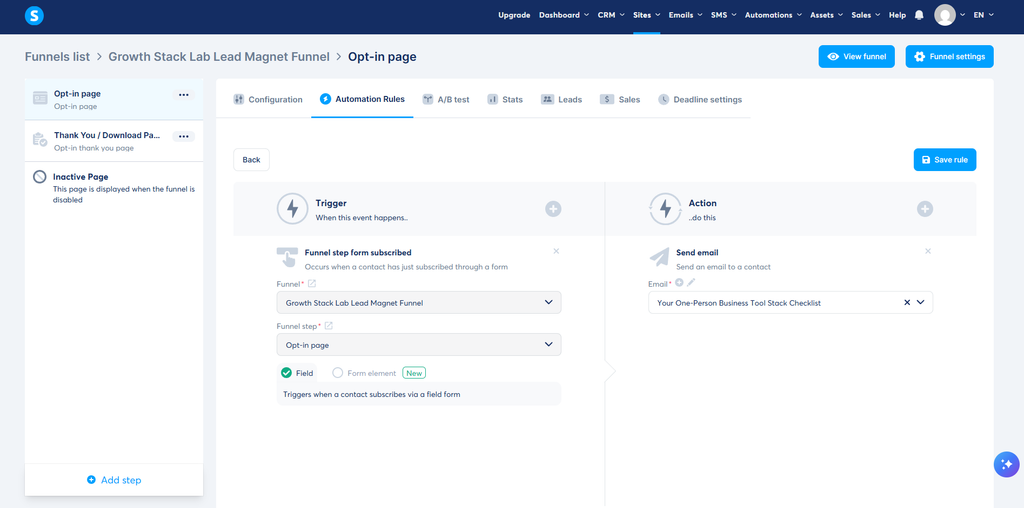
Inside my funnel, I selected the Opt-in page and opened the Automation Rules tab.
I created a rule using the following configuration:
| Setting | Value |
|---|---|
| Trigger | Funnel step form subscribed |
| Funnel | Growth Stack Lab Lead Magnet Funnel |
| Funnel step | Opt-in page |
| Type | Field |
| Action | Send email |
| Your One-Person Business Tool Stack Checklist |
The key detail was selecting the correct funnel step.
While configuring the rule, I initially had the Thank-you page selected. I changed it to the Opt-in page before saving because the email should be triggered when someone submits the registration form.
I then selected the delivery email and saved the rule.
The automation appeared as active in the funnel dashboard.
I cover the broader automation features in my Systeme.io Automation Review.
An important lesson from this step is that choosing the correct trigger matters just as much as writing the email itself.
If the trigger points to the wrong step, the automation may not behave as intended.
9. Test the Complete Funnel Using a Separate Email Address
After configuring the pages, PDF, and automation, I ran a real end-to-end test.
I opened the public opt-in URL rather than relying exclusively on the editor.
I then entered a separate test email address and submitted the form.
The browser successfully redirected me to the completed thank-you page.
The main heading, supporting text, and download button all appeared correctly.
I then checked the test inbox.
The automated delivery email arrived in Gmail’s regular inbox.
This was an important result, but it only describes my own test. It does not establish that every subscriber or email provider will handle future messages the same way.
If your test email does not arrive, work through the Systeme.io email troubleshooting checklist before repeating the signup. It separates form and campaign enrollment problems from timing, contact status, and inbox placement.
Next, I opened the link inside the email.
It successfully opened the correct one-page PDF hosted on the Growth Stack Lab website.
This confirmed that the email delivery link worked independently of the thank-you page’s direct download button.
My Actual Test Results
| Test | Result |
|---|---|
| Public opt-in form submission | Passed |
| Thank-you page redirect | Passed |
| Contact creation | Passed |
| Automation execution | Passed |
| Delivery email received | Passed |
| Gmail inbox placement | Regular inbox |
| Email PDF link | Passed |
| Unsubscribe process | Passed |
10. Test the Unsubscribe Process
I did not want to stop the experiment immediately after receiving the PDF.
An email funnel should also give recipients a functioning way to stop receiving marketing messages.
I clicked the Unsubscribe link at the bottom of the delivery email.
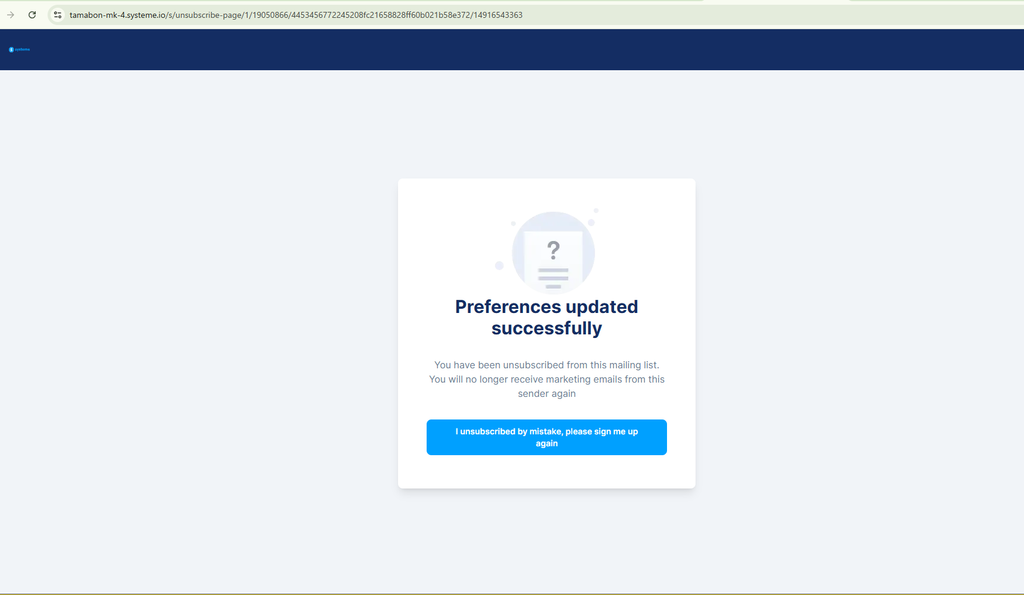
Systeme.io opened its unsubscribe page and displayed the option to unsubscribe from all marketing emails.
I selected Confirm.
The next screen displayed a successful preference update and explained that marketing emails from the sender would no longer be received.
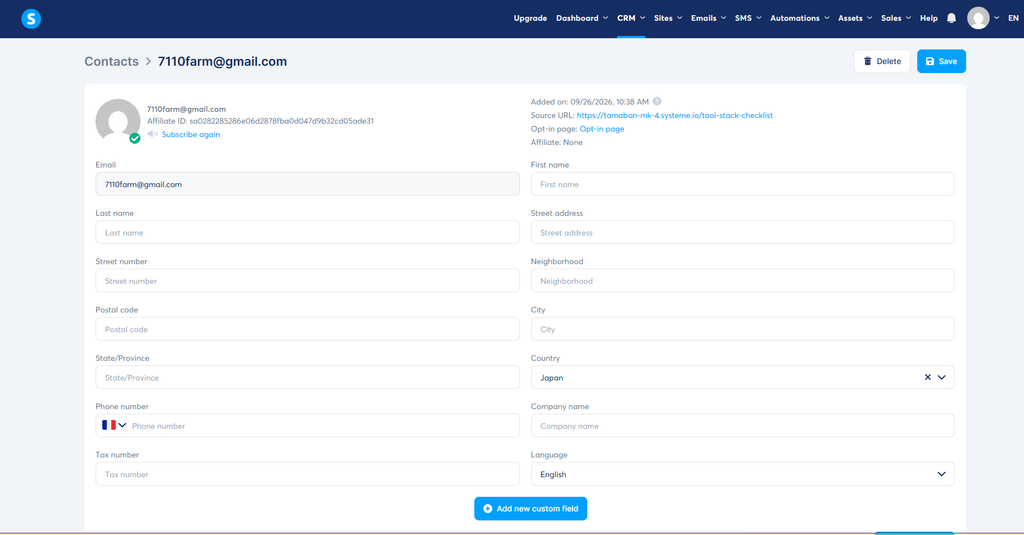
Finally, I returned to the Systeme.io CRM and opened the test contact.
The contact remained in the database, and the interface displayed a Subscribe again option, consistent with the completed unsubscribe action.
The email history also showed the delivery message, while the automation history showed the Send email action.
This was useful because it let me verify both the subscriber-facing result and the corresponding CRM record.
11. Problems I Encountered and How I Fixed Them
Not every part of the configuration worked perfectly on the first attempt.
A few issues were worth documenting.
Problem 1: The Original Template Had Unrelated Content
The opt-in and thank-you templates contained elements intended for completely different businesses.
Some of the original copy referred to volunteering, healthcare, or appointments.
I replaced the text, removed unnecessary navigation where possible, and simplified the main section.
The practical lesson is to review the entire page, not just the visible headline and button.
Problem 2: The Download Button Did Not Initially Respond During Testing
My first download setup used the Open URL button action.
I subsequently switched to Download file and uploaded the PDF directly into Systeme.io.
The file opened successfully during the live funnel test.
If a download does not behave as expected, check the button action, selected file, saved settings, and live URL separately.
Problem 3: The Automation Trigger Initially Referred to the Wrong Step
When creating the automation, the funnel step initially pointed to the Thank-you page.
I corrected it to the Opt-in page.
This distinction matters because the trigger must correspond to the form where the subscriber enters their email address.
Problem 4: I Had to Distinguish a Genuine Delivery Email from an Unrelated Message
During the Gmail verification process, I initially inspected an unrelated SEO report.
After searching for the exact subject line, I located the correct Systeme.io delivery email.
The lesson is simple: verify the subject, sender, and content before recording a delivery test as successful.
12. Was the Systeme.io Free Plan Enough?
For this particular experiment, the Free plan supported the configuration I needed.
I was able to build the pages, upload the checklist, configure a delivery email, and connect the registration form to an automation rule.
My test used one funnel and one automation rule.
This was enough for the simple PDF delivery workflow described in this article.
However, this experiment does not establish whether the Free plan would be suitable for a larger business with multiple campaigns, complex automation sequences, or a growing subscriber database.
Before building a larger system, I recommend checking the current plan limits against your actual requirements.
For a more detailed discussion, read Growth Stack Lab’s Systeme.io Free Plan Limitations article.
You can also consult the official Systeme.io pricing page for current plan features and restrictions.
13. What This Experiment Actually Proved
My Systeme.io lead magnet funnel experiment focused on testing the complete subscriber journey rather than simply publishing a landing page.
This experiment demonstrated that I could create a simple email capture and PDF delivery workflow using Systeme.io.
I verified the main steps myself rather than relying only on the platform’s feature descriptions.
The workflow successfully:
- Accepted an email address.
- Redirected the visitor to the thank-you page.
- Created a CRM contact.
- Triggered an automated email.
- Delivered the email to my Gmail inbox.
- Opened the checklist through the email link.
- Processed an unsubscribe request.
There are also clear limitations to this result.
I used a single test subscriber.
I did not measure conversion rates, campaign performance, long-term deliverability, or real audience growth.
Those questions require additional tests and actual visitor data.
This test used one automated delivery email. For a proposed three-email follow-up, see our Systeme.io welcome email sequence guide. Growth Stack Lab has not configured or tested that sequence.
However, the experiment did establish that the basic lead magnet journey worked in my configuration.
For someone setting up a one-person business, this is a useful first milestone: knowing that the complete technical workflow functions before investing time or money in driving traffic to it.
Frequently Asked Questions
Can I build a lead magnet funnel with Systeme.io for free?
Yes. I created and tested this particular funnel using a free account. The Free plan includes funnel, email, and automation functionality, subject to its usage limits.
Can Systeme.io send a PDF automatically after someone subscribes?
Yes. You can connect an opt-in form to an automated email and include a downloadable PDF link.
A PDF can also be provided through a download button on the thank-you page.
In my experiment, I tested both delivery methods.
Does Systeme.io require a separate email marketing service?
Not for the basic workflow tested here. I used its built-in email and automation features.
The registration, contact creation, email delivery, and unsubscribe process were all handled within my Systeme.io setup.
What happens after someone submits an opt-in form?
In my configuration, the submission created a contact, redirected the visitor to the next funnel step, and triggered a delivery email.
I confirmed these actions through the live test and the contact history inside the CRM.
Can subscribers unsubscribe from automated emails?
Yes. My test delivery email included an unsubscribe link.
I completed the unsubscribe process and checked the updated subscription status in the CRM.
The contact record remained available, but the interface displayed an option to subscribe again.
Final Thoughts
Building my first Systeme.io lead magnet funnel helped me understand the difference between configuring a marketing workflow and confirming that it actually works.
The editor made it possible to create the pages without coding, while the automation system connected the registration form to the delivery email.
The most valuable part of the process was the final test.
By using a separate email address, I could experience the funnel as a subscriber, identify configuration details that needed attention, and confirm the actual delivery and unsubscribe behavior.
For someone running a one-person business, a simple, tested workflow is a useful starting point.
Want to try building your own funnel?
Explore Systeme.io’s Free plan and test the complete signup and delivery process before relying on it for a real audience.
A final reminder: always test the full subscriber journey yourself, including the download link and unsubscribe process, before sending traffic to a new funnel.